
Glossy or Matte Monitor: Choose for the Room, Not the Label
Compare screen reflections using real room lighting, dark content and daily work before choosing a glossy or matte monitor finish.
2026-09-26T16:00:00+00:00
Published by HeCai Computer. Contact us about a correction or model-specific question.
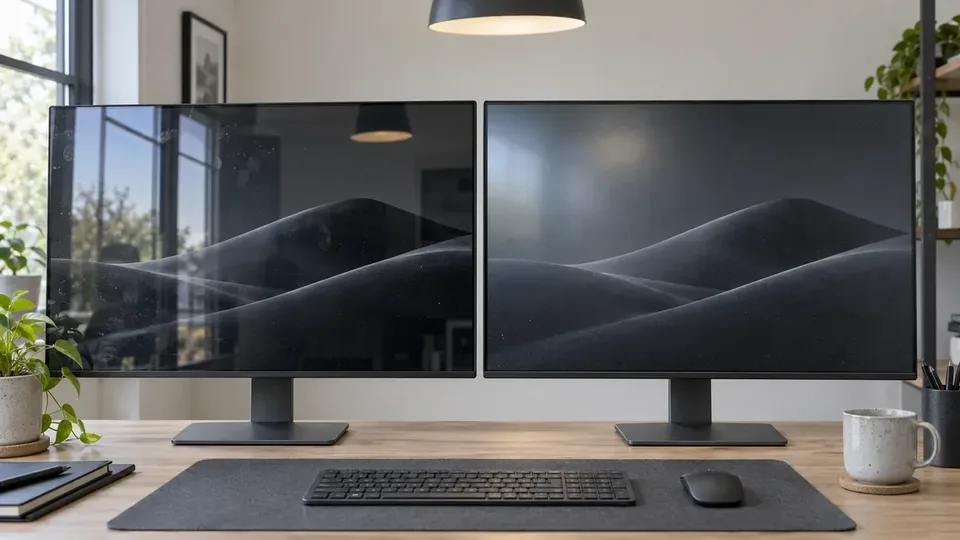
The finish of a monitor changes the way room light interacts with the screen. It does not set the display resolution or guarantee accurate color. A useful glossy-versus-matte comparison begins with the room where the monitor will be installed, particularly the location of windows and lamps.
Understand the difference in reflections
A glossy surface tends to preserve more recognizable reflections. A matte treatment scatters reflected light, which can make a lamp less mirror-like but may spread its effect across a larger area. Coatings vary considerably: two monitors both described as matte can have noticeably different texture and reflection behavior.
| Situation | What to inspect |
| Window behind the user | Whether a reflection crosses the main reading area |
| Bright ceiling lighting | Localized reflections and any wider haze |
| Dark game or film scenes | How room light affects visible shadow detail |
| Text on a light background | Surface texture, clarity and comfortable brightness |
Compare under matched conditions
Place candidate screens where the finished setup will be used. Use comparable brightness and the same content; a much brighter screen can appear to handle reflections better simply because it is emitting more light. Check both light documents and dark scenes from the normal viewing position.
Keep coating and color performance separate
A glossy image can look vivid in controlled lighting, while a matte screen can be easier to position in a bright office. Neither observation proves a particular gamut, calibration accuracy or contrast ratio. If color work is important, evaluate those characteristics with appropriate measurements on the complete display.
Consider whether the room can change
Moving a desk sideways to a window, changing a lamp angle or adding blinds may improve a screen more than changing the finish. In a shared office those changes may not be practical, making a reflection-tolerant surface more valuable. In a controlled gaming room, the user may be willing to manage the lighting instead.
Include cleaning in sample evaluation
Fingerprints, dust and cleaning marks are easier to notice on some surfaces than others. Follow the manufacturer's cleaning instructions, switch off the display and avoid abrasive material or unapproved chemicals. Do not add an aftermarket coating or film without checking compatibility and warranty implications.
For a product range, describe the actual coating and show the screen under representative lighting. A clear account of reflection behavior is more useful than calling one finish universally superior.
Apply This Guide to Your Purchasing Project
- Compare relevant models
Compare published specifications before choosing a configuration for sampling.
- Plan an OEM project
Discuss artwork, housing, connections and the sample approval process.
- Prepare a wholesale inquiry
State your destination, quantities, schedule and model requirements for a written quotation.