
How to Specify a Repeatable Monitor Brightness Test
Define display settings, test pattern, measurement positions and instrument conditions before comparing monitor luminance results.
2026-10-08T16:00:00+00:00
Published by HeCai Computer. Contact us about a correction or model-specific question.
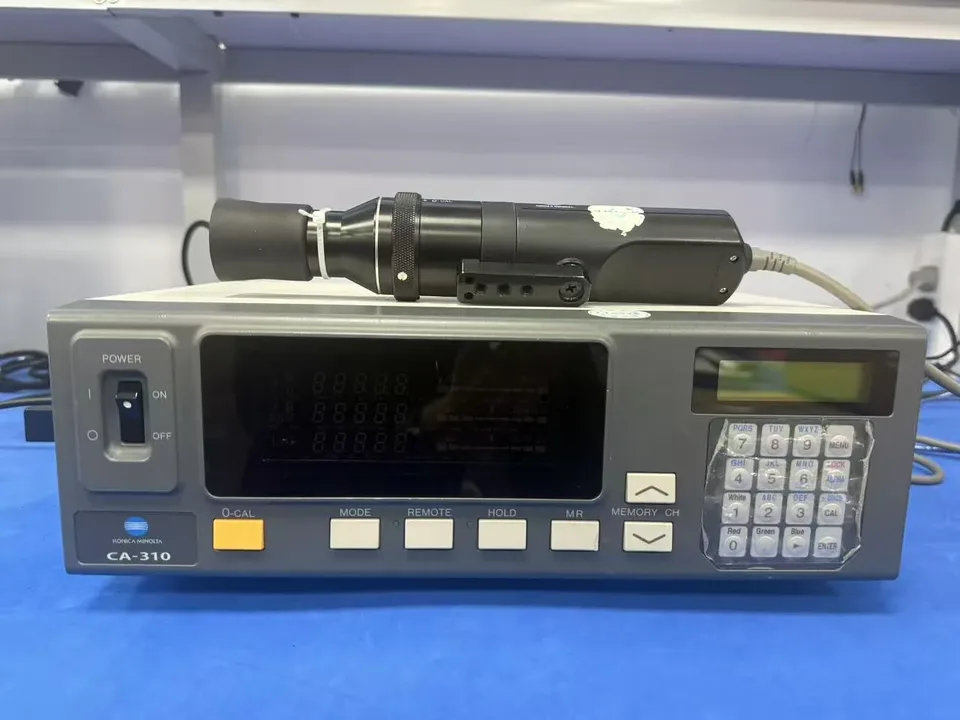
A brightness number is useful only when the test conditions are known. A center reading from an SDR white screen cannot be compared directly with an HDR peak measured in a small window. Buyers should agree on a method before using luminance results to approve a monitor configuration.
Separate luminance from the brightness slider
Display luminance is commonly expressed in cd/m², also called nits. A monitor's on-screen brightness percentage is a control setting, not a calibrated nit value. A browser page can supply a test pattern, but a suitable optical instrument is needed to measure the light emitted by the screen.
Define the setup before taking readings
Record the monitor configuration, input signal, picture preset, brightness control, color mode and any automatic brightness or energy-saving feature. Allow stabilization according to the test method and instrument guidance. Control ambient light and position the sensor consistently so room reflections do not become part of an unexplained result.
| Test item | What the report should identify |
| Signal | SDR or HDR, input and pattern level |
| Pattern | Full field or window size, background and duration |
| Settings | Picture mode, controls and dynamic functions |
| Instrument | Model, calibration or correction and measurement geometry |
| Result | Position, units and time after pattern appearance |
Measure uniformity separately
A center reading does not describe the corners. If uniformity matters, use an agreed grid and report each location along with the calculation used. Different definitions of uniformity can produce different percentages from the same measurements, so retain the underlying readings rather than only a summary figure.
Handle HDR and OLED with appropriate patterns
HDR output and OLED luminance can depend on window size, duration, thermal conditions and automatic limiting behavior. Record those factors and distinguish brief peak output from sustained output. An SDR full-screen number should not be relabeled as HDR peak brightness or used to imply an HDR certification.
Set acceptance terms before the order
Agree on whether a value is typical, minimum or a target for a specific sample. Include tolerances, sampling method and the exact configuration in the purchase documentation. If two laboratories disagree, reproduce the same settings and pattern before concluding that the hardware changed.
For a brightness inquiry, send the intended environment and operating mode. A suitable acceptance method for a bright reception desk may differ from one intended for a dim gaming room.
Apply This Guide to Your Purchasing Project
- Compare relevant models
Compare published specifications before choosing a configuration for sampling.
- Plan an OEM project
Discuss artwork, housing, connections and the sample approval process.
- Prepare a wholesale inquiry
State your destination, quantities, schedule and model requirements for a written quotation.
Technical Standards & Further Reading
Use the official standards below when evaluating a display specification. Product support and certification must be confirmed for the exact model and configuration.